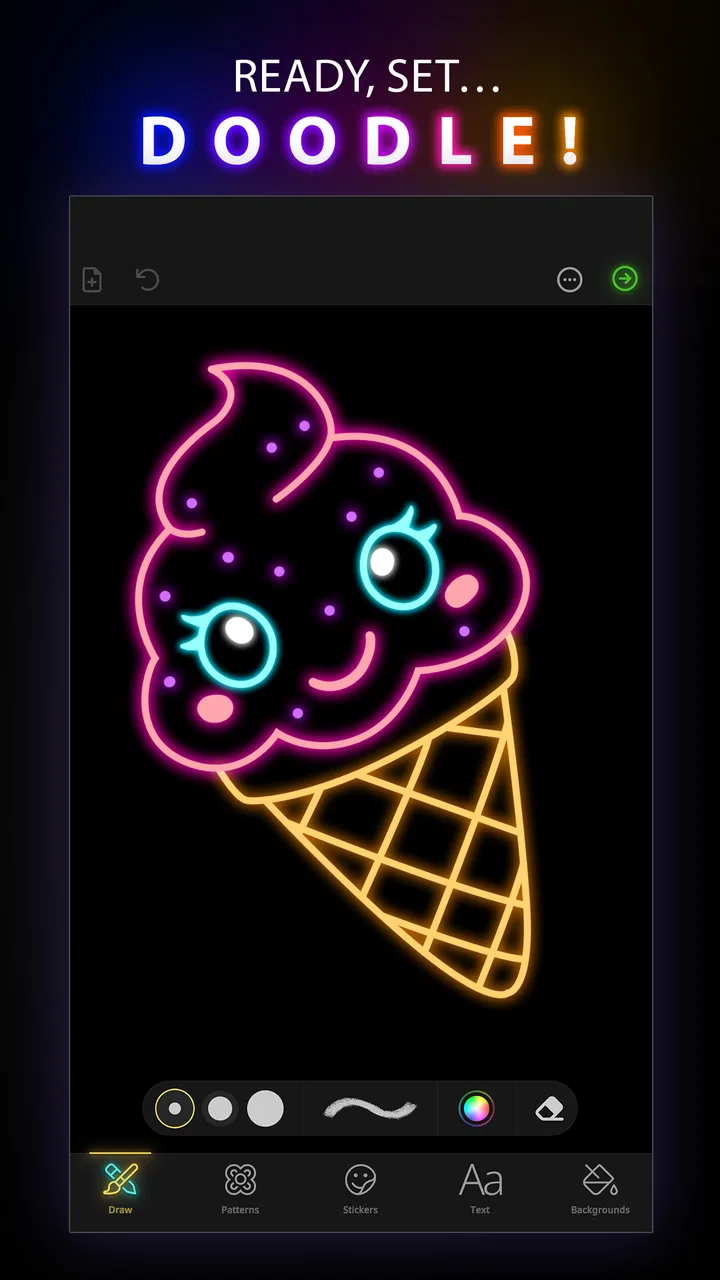
Doodle Art: Magic Drawing App
- 4.3
- Rating
- 5.00M
- Installs
- Free
- Price
 Analysis by App-foxy
I opened Doodle Art: Magic Drawing App expecting a relaxed drawing tool rather than a full digital-art studio, and that distinction matters. This is an Art & Design app from Peaksel Games built around doodling, decorative line work, and turning simple marks into something that feels more polished. I found it easiest to judge as a creative escape: something to use during a quiet break, while travelling, or whenever I want to make an image without first learning a complicated design program.
The app is free to start, carries an Everyone age rating, and has reached more than five million installs. Its average score sits at 4.3 from roughly thirty-three thousand ratings, which gives a useful indication that the basic idea connects with a broad audience. Still, popularity alone does not answer the important question: is it the right drawing app for you? My answer depends mainly on whether you want guided, satisfying doodling or precise control over a professional illustration workflow.
How I would decide whether it fits
I would judge the fit by what happens after the first few drawings: do I still enjoy shaping simple marks into patterns, or am I waiting for the app to supply a new kind of challenge? A useful test is to return to one unfinished idea on another day and see whether adding to it feels inviting rather than obligatory. That helps clarify the kind of routine the app can support.
You May Also Like

 Blood Strike: 2.5 Anniversary
Blood Strike’s Loadouts Turn Every Drop Into a Tactical Gamble
A close look at Blood Strike’s custom loadouts: how fast access to signature weapons reshapes its battle royale rhythm, rewards preparation, and narrows the gap between fights.

 Pandora - Music & Podcasts
Pandora’s Music Is Easy to Start, but Harder to Recover
Pandora’s strength is its low-effort path from a seed to a station. Its weak spot is how much confidence it asks you to place in connection, setup, and quiet recovery.

 8 Ball Pool
 Is Built on Rivalries, Rematches, and Routine
A close look at the rivalries, rematches, shared routines, and unanswered safety questions that turn a quick pool match into a persistent mobile community.

 Samsung Music
’s Quiet Strength Is Playing What You Already Own
Its reach comes less from spectacle than from dependable access to a personal library. That simplicity is both the app’s strongest retention engine and its ceiling.

 AccuWeather: Weather Radar
AccuWeather Review: A Quick, Clear Forecast for Everyday Decisions
For everyday plans, the best forecast is the one you can understand quickly. AccuWeather makes rain timing, radar, and local conditions easy to act on, with a few trade-offs.

 Hill Climb Racing
Why Hill Climb Racing Still Turns Crashes Into One More Run
A tiny car, a bumpy hill and one more upgrade: Hill Climb Racing keeps resurfacing because its simple chaos makes every near-miss feel personal.
More From Our News Desk



Start with the kind of drawing you actually want to make
Before choosing this app, I would separate three very different needs. The first is casual creativity: filling spare time with patterns, shapes, and flowing lines. The second is decorative drawing, where the pleasure comes from building symmetry and detail rather than producing a technically accurate sketch. The third is serious illustration, where layers, advanced brushes, exact selections, typography, and export control can be essential.
Doodle Art: Magic Drawing App makes the most sense in the first two situations. I could pick it up without treating the opening screen like a lesson in digital painting. The experience encourages experimentation, and the visual result can look more elaborate than the individual strokes that created it. That makes it approachable for someone who says, “I cannot draw,” but still enjoys making patterns.
If your goal is to retouch photographs, design a logo, trace an object accurately, or prepare artwork for a client, I would set a different expectation. A doodle-focused app is not automatically a replacement for a full illustration suite. The right decision is not based on which app has the longest feature list; it is based on whether the app’s central gesture matches the way you want to create.
What I noticed during ordinary use
My most useful test was a short evening session. I started with no subject in mind and treated the canvas like a notebook margin. Instead of worrying about proportions, I concentrated on repeating marks and letting the drawing grow outward. That workflow made the app feel less like a blank page demanding a finished idea and more like a prompt to keep moving.
There is a psychological advantage here. In a conventional drawing app, a single imperfect line can make me want to undo everything. With doodling, irregularity is part of the character. I could turn a rough starting point into a pattern, then add small details until the image felt intentional. For beginners, that forgiving structure may be more valuable than a large collection of advanced tools.
I also found that the app suits short sessions better than long, highly planned projects. A ten-minute break can produce something recognizable and personal. Longer sessions are possible, but repetitive drawing can become tiring if you are looking for constant novelty rather than a meditative rhythm.
The small workflow choices that make a difference
One practical tip is to begin with a limited visual idea instead of trying to fill the whole canvas immediately. I had better results when I chose one repeating motif, such as loops or angular marks, and allowed variations to develop gradually. This prevents the common beginner problem of adding unrelated details until the image feels crowded.
A second useful habit is to pause before decorating every empty area. Negative space can make a doodle easier to read, while filling everything may hide the shapes that first made the drawing appealing. I would create the main structure, step back, and only then decide which gaps genuinely need attention.
A third insight is that this app can work as a warm-up tool even if you eventually finish artwork elsewhere. I can use freeform doodling to loosen my hand, explore a repeated pattern, or discover a visual theme before moving to a more precise application. In that role, it does not need to replace a professional editor to be useful.
Where the app wins over more demanding alternatives
For me, the advantage over a more demanding art tool is not simply having fewer controls; it is spending less attention on setup and more on the repeated marks themselves. That can make a brief session feel complete even when I have no polished project in mind. The trade-off is that ease works best when decorative doodling is the goal, not when I need detailed editing.
It lowers the entry barrier
The strongest advantage is immediacy. I did not need to understand a complex workspace before making progress. That makes it a good choice for children, casual users, and adults who want a creative activity without committing to a course in digital art. The Everyone rating also makes it easier to recommend for shared household use, although younger users may still benefit from an adult explaining any purchase prompts.
Many general drawing apps present dozens of controls before the user has found a comfortable first action. Here, the doodle concept gives the session a clear direction. The app’s appeal comes from transforming simple drawing into a decorative result, not from trying to imitate every tool found in a desktop graphics program.
It supports a meditative kind of creativity
I would recommend it to someone who likes coloring books, pattern-making, or repetitive crafts. The value is not only in the finished picture. The repeated movement can be calming, especially when I stop judging each line and focus on the rhythm of the drawing. This is a different benefit from photo editors, which are usually about correcting or enhancing something that already exists.
It can also be a useful activity for family members with different skill levels. One person can make a simple outline while another adds decorative details. Because the goal is expressive rather than technically exact, the session does not have to become a contest over who can draw most realistically.
The free starting point helps with the decision
The app is free, so I can test the core experience before deciding whether it deserves a permanent place on my phone. That is important for this type of product because enjoyment is personal. Some people will immediately find the repetitive process relaxing; others will discover that they prefer structured tutorials or realistic brushes.
There are in-app purchases ranging from ninety-nine cents to forty-nine dollars and ninety-nine cents per item. I would treat that range as a reason to pay attention during use rather than as an automatic negative. Occasional users can begin without paying, while frequent users should look carefully at what any optional purchase adds and whether it improves their particular workflow.
It is approachable without pretending to be a professional studio
That honest positioning is one of its better qualities. I would not choose it for precision drafting, but I also would not want a doodle session buried under specialist terminology. Peaksel Games has kept the central idea easy to understand: draw freely, build visual interest, and enjoy the process.
The current version is 6.1.8, and the minimum operating-system requirement is version 9. That makes the app accessible to people using older compatible devices, though the practical experience will still depend on screen size, responsiveness, and how comfortable the device is for drawing. A larger display is preferable for detailed patterns; on a small phone, I would use broader marks and avoid trying to create extremely fine decoration.
Where another category may serve you better
I would look beyond drawing apps if the main thing I want is a ready-made outline, a practical visual note, or precise control over a finished illustration. Those needs reward structure and editing tools more than spontaneous pattern-making does. Thinking about the result I need before opening the app can save me from mistaking a focused doodle experience for an all-purpose art workspace.
Choose a full illustration app for control
If you already think in layers, masks, brush engines, and carefully edited selections, a professional illustration app will probably feel more suitable. Those tools are better when I need to revise one part of an image without disturbing the rest, build a composition from separate elements, or maintain exact control over color and shape.
Doodle Art: Magic Drawing App is more appealing when the act of drawing is the destination. A full illustration program is often better when the drawing is one stage in a larger production process. That difference becomes obvious if you are preparing artwork for print, a presentation, a brand identity, or a detailed personal project that may be revised repeatedly.
Pick a coloring app when relaxation matters more than invention
Coloring applications provide a more guided experience. They can be ideal when I want to select colors and fill existing outlines without deciding what to draw next. This app asks more from me creatively because I have to create the marks myself. That is rewarding when I want ownership of the image, but it may feel like work on a day when I only want a quiet, low-decision activity.
The trade-off is simple: coloring apps reduce the fear of a blank canvas, while this doodle app gives me more room to develop a personal pattern. Neither approach is universally better. I would choose based on whether I want to invent the structure or decorate one that is already there.
Use a note-taking sketch tool for quick visual reminders
For diagrams, arrows, handwritten lists, or rough planning, a note-taking app may be faster. Its purpose is communication and retrieval, not decorative development. I would not open this app to map a room, annotate a receipt, or capture a meeting idea unless the visual treatment itself was part of the point.
On the other hand, if a simple reminder needs a more attractive border, pattern, or personal touch, doodling can turn an ordinary note into something memorable. I see it as a creative companion to practical tools, not a replacement for them.
Know who should probably skip it
I would suggest skipping this app if you need dependable professional output, highly accurate drawing aids, or a workflow centered on editing imported assets. I would also hesitate to recommend it to someone who dislikes repetition. The same quality that makes the experience calming can feel limited if you expect every session to introduce a new challenge.
It may also be a poor fit for users who want a completely distraction-free, no-purchase creative environment. Since optional purchases are present, anyone sharing the device with a child should take a moment to understand the purchase flow before handing it over. The free entry point is useful, but “free” does not mean every part of the experience will suit every budget or preference.
What switching to it feels like
Switching to this app is less about mastering a new toolkit and more about changing my expectations: I let repetition and small variations carry the session instead of planning every detail. I would start with one modest motif, then decide whether the process itself feels rewarding enough to revisit. That first low-pressure experiment is a better guide than judging it by how elaborate the finished drawing looks.
The learning cost is low, but the creative adjustment is real
Moving from a complex drawing program to this app should be easy from a controls perspective, yet the bigger adjustment is mental. I had to stop looking for the perfect brush or the most efficient editing method and start thinking in terms of rhythm, repetition, and visual balance. Someone coming from a coloring app faces the opposite change: more freedom, but also more responsibility for the first mark.
That is why I would test it with a small personal project rather than judging it after a single glance. Try making one pattern with a clear center, one loose abstract doodle, and one drawing intended as a gift or decoration. Those three sessions reveal whether you enjoy the app’s core loop or merely like the idea of it.
Build a repeatable routine instead of chasing complexity
My preferred routine is to spend the first few minutes creating a simple base, the next few adding repeated details, and the final moment removing or avoiding anything that makes the image feel overloaded. This approach produces more coherent results than improvising every stroke with equal importance.
Another practical choice is to decide in advance whether the session is about relaxation or a finished image. When I mix those goals, I become frustrated: relaxation asks me to accept accidents, while a finished image asks me to correct them. Keeping the purpose clear makes the app feel more satisfying.
Think about device and audience before committing
For personal use, a phone is enough to explore the concept. For shared drawing or more detailed work, a larger compatible screen would be more comfortable. I would also consider the user’s patience. A child who enjoys making patterns may stay engaged, while someone expecting an instant animated effect or a game-like reward system may lose interest quickly.
The app belongs in the Art & Design category, but I would describe its role more narrowly: it is a casual creative workspace centered on doodling. That description helps prevent disappointment. It does not need to compete with every art app because its best use is more focused.
My recommendation after using it
I recommend Doodle Art: Magic Drawing App to beginners, casual artists, families looking for a shared creative activity, and anyone who finds repetitive pattern-making relaxing. It is especially appealing if you want to draw without first mastering a complicated interface. The free starting point makes trying it sensible, and the broad audience reflected in its rating and install count suggests that the concept has lasting everyday appeal.
I would recommend it less strongly to experienced illustrators who need a serious production workflow. In that case, a dedicated illustration tool will likely be the better primary choice, while this app could still serve as a warm-up space for ideas. Likewise, users who prefer guided coloring or practical note-taking should choose an app built around those activities rather than expecting doodling to cover every need.
My final decision guide is straightforward: choose this app when you want the pleasure of making patterns and decorative drawings with minimal friction. Try a different category when precision, editing depth, or structured templates matter more than spontaneous marks. Its real strength is not replacing every art tool; it is making creative drawing feel easy enough to begin and relaxing enough to return to.
Peaksel Games has created an approachable free app with a clear identity, and that clarity is what I value most. I can open it with no finished concept, make a few marks, and gradually find an image in them. That will not satisfy every artist, but for the right person, it turns a blank screen into a low-pressure invitation to create.
FAQs for Doodle Art: Magic Drawing App
01What is Doodle Art: Magic Drawing App?
Doodle Art: Magic Drawing App is a creative tool designed for both amateur and professional artists. It offers a variety of brushes, colors, and effects that allow users to create intricate designs or simple doodles with ease. The app is suitable for all ages and skill levels, making it an excellent choice for anyone looking to explore their artistic side.
02Is Doodle Art: Magic Drawing App free to use?
Yes, Doodle Art: Magic Drawing App offers a free version with basic features. However, to access advanced tools and options, users may need to make in-app purchases. These premium features enhance the overall experience, providing a more comprehensive set of tools for detailed artwork.
03Can I share my artwork created in Doodle Art: Magic Drawing App?
Absolutely! The app allows users to share their creations directly from the platform to social media networks or save them to their device. This feature makes it easy for artists to showcase their work to friends, family, or a wider audience, and receive feedback on their creativity.
04What devices are compatible with Doodle Art: Magic Drawing App?
Doodle Art: Magic Drawing App is available for both Android and iOS devices. It is optimized for smartphones and tablets, ensuring a seamless drawing experience across different screen sizes. Users should check the app store for specific device compatibility and system requirements before downloading.
05Does Doodle Art: Magic Drawing App support layers and advanced editing tools?
Yes, the app offers support for layers and includes a range of advanced editing tools. These features are particularly beneficial for users looking to create complex designs. They allow for more precise control over the artwork, enabling the creation of professional-quality illustrations.
Pros
- User-friendly interface makes it easy to start drawing.
- Wide variety of brushes and colors available.
- Includes tutorials for beginners.
- Supports high-resolution exports for printing.
- Regular updates with new features and tools.
Cons
- Some advanced features are locked behind a paywall.
- Occasional lag on older devices.
- Ads can be intrusive during sessions.
- Limited cloud storage for free users.
- No offline mode for certain features.

Doodle Art: Magic Drawing App
Gallery